Scheduling software for field-based teams
The right person on every job. No clashes. Every mile counted.
For maintenance, facilities, installation and service businesses with people and vehicles out across many sites. DesignMend gives each job to someone qualified and free, favours the lowest cost and the shortest travel, and tells you plainly when a job can't fit.
Demo: a 30-minute video call.
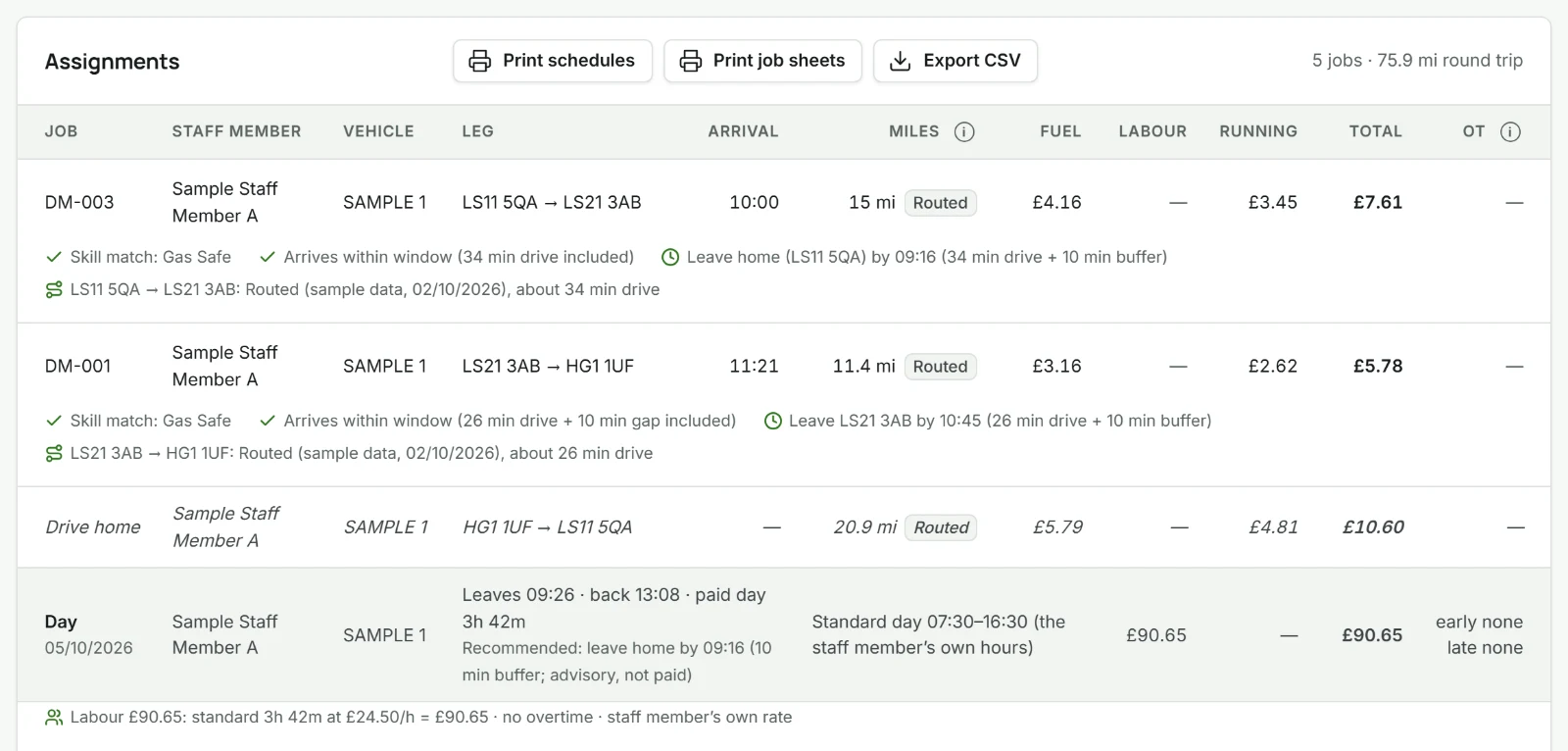
How DesignMend runs
- Works offline
- No cloud copy of your data
- Stored on your device
- Back up and export
Who it's for
For teams sending people and vehicles to jobs across many sites.
The trade changes; the planning problem doesn't. You describe the skills your jobs need, and you can create, rename and delete your own skills and job types.
- Maintenance
- Facilities management
- Installation
- Service and repairs
- Construction
- Logistics
Rules, not memory
What changes when the plan follows rules instead of memory.
- Skills
- From memoryThe nearest person goes, qualified or not.
- With DesignMendOnly people with the required skill are considered.
- Availability
- From memoryTwo jobs land in one diary at 10:00.
- With DesignMendA proposed schedule never double-books a person or a vehicle.
- Travel
- From memoryTwo vans cross the county in opposite directions.
- With DesignMendAmong suitable people, the cheapest, shortest option is chosen.
- Conflicts
- From memoryA job that doesn't fit is squeezed in anyway.
- With DesignMendIt's left pending, with the reason.
How it matches
Five rules, always in the same order.
A lower rule never overrides a higher one. It won't save a few pounds by sending someone without the skill. Skill and availability are strict; cost, mileage and overtime choose between the people who qualify.
- 1
SkillHolds the required skill
- 2
AvailabilityFree, with no clash
- 3
CostLowest added cost
- 4
MileageFewest miles, when costs tie or aren't set
- 5
OvertimeLeast added overtime, if still tied
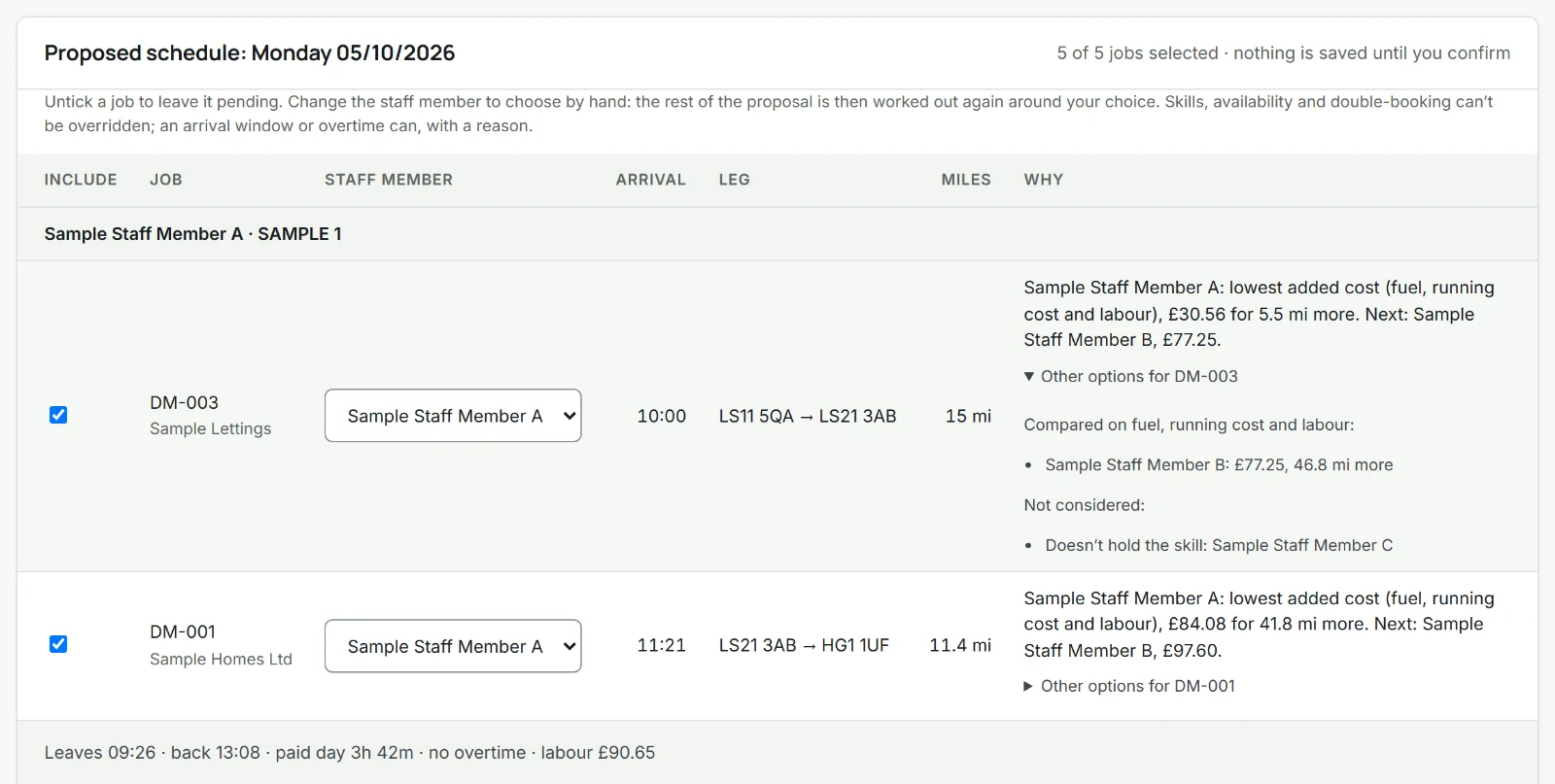
When a job can't fit
You're told which job, and why.
Nothing is forced in to make the day look full. Each job that can’t be placed stays pending, with its reason.
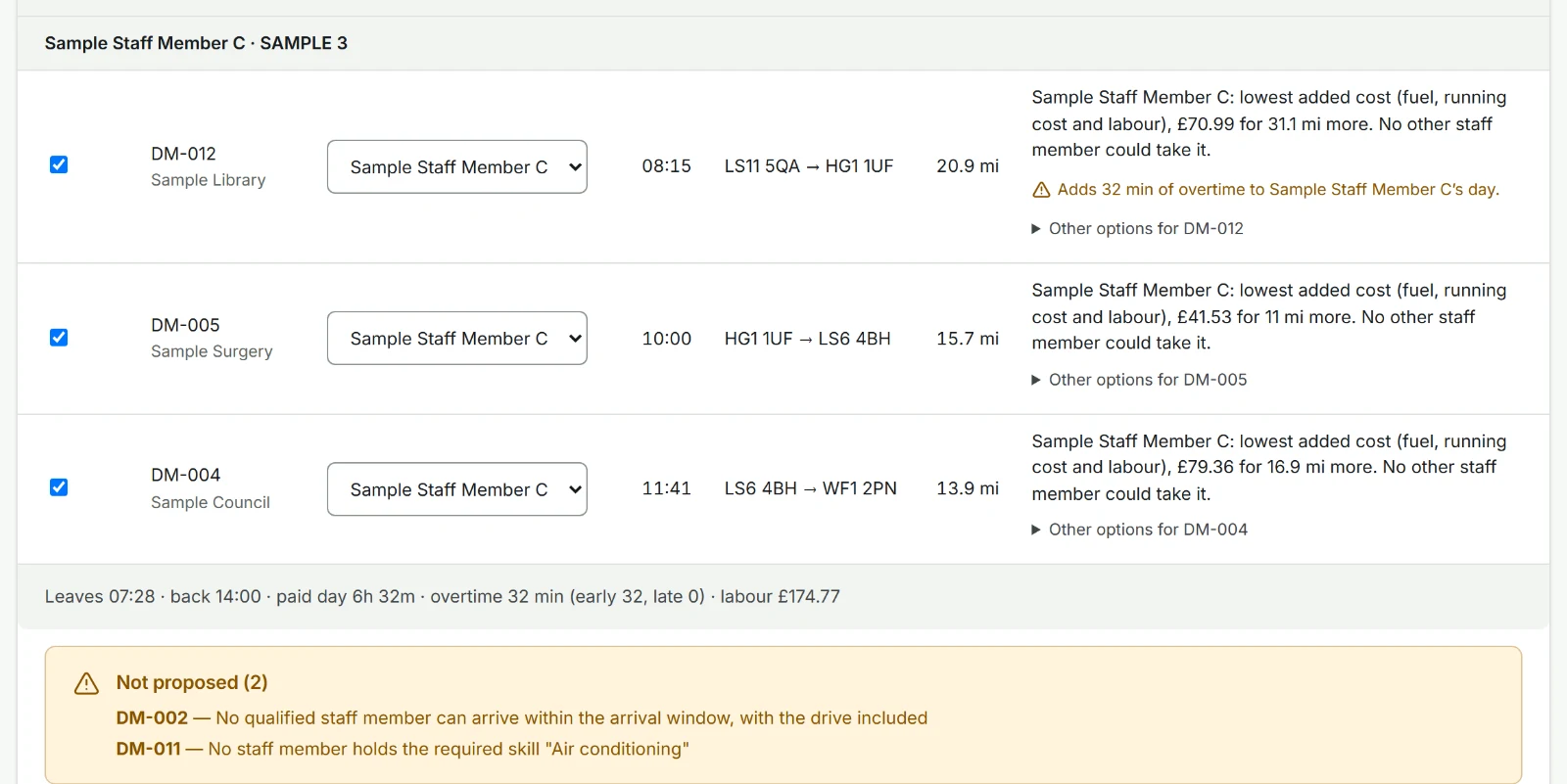
Then, the consequence
What the day makes
Quoted − Costs = Estimated profit for the planned jobs, worked out when you confirm a schedule. Costs are fuel or energy, vehicle running cost, and labour including overtime. Mileage drives the fuel and running costs, so it is never counted a second time. A cost that can't be worked out is shown as not set, never as £0.
Example data
| Line | Amount |
|---|---|
| Quoted, 2 planned jobs | £2,480 |
| Fuel | −£310 |
| Vehicle running cost | −£240 |
| Labour, standard hours | −£980 |
| Labour, overtime Overtime | −£125 |
| Estimated profit | £825 |
How it works
From job list to finished plan in four steps.
-
Step 1: Add people and vehicles
Skills, hours, costs and vehicles.
-
Step 2: Add the jobs
Skill, time window, location and price.
-
Step 3: Propose a schedule
Jobs proposed by the five rules, or marked pending. You review it first: nothing is saved until you confirm.
-
Step 4: Confirm and print
Confirm the day, then print it or save it as a PDF: a schedule for each person and a job sheet for each job.
On the day
What you get when the plan is done.
Built to balance 20+ staff and vehicles across 100+ jobs, and tested with 50 people, 50 vehicles and 300 jobs in a day.
-
A clash-free day
You see: who's where, in which vehicle, all day.
-
Qualified people only
You see: who's qualified for each job.
-
Mileage and overtime, flagged
You see: each person's miles for the day, and their overtime.
-
Profit for the day
You see: what the day is expected to make, and what it costs.
Your data
Your plan lives on your device.
Keep planning when the connection drops, and keep your data under your control. There's no cloud copy: your account holds only your sign-in and your subscription. Your plan leaves the device only when you export or back it up, plus, in the hosted app, the postcodes sent to look up road distances.
- Offline use
- Runs in your browser. Once opened, the hosted app keeps working without a connection for up to 7 days after it last checked your log-in; looking up road distances needs one, or you can enter distances by hand. There is also a single-file copy that never connects to anything and needs no log-in.
- Storage and privacy
- Stored in your browser's own database (IndexedDB), not on our servers. Clearing the site's data in your browser deletes it, so keep backups. Set a passcode and it is encrypted on your device; without one it is not. Apart from logging in and your subscription (your email address, and your payment on Stripe's own pages), the only thing the app sends out is postcodes, to look up road distances: no names, addresses, rates or registrations. There are no ads, analytics or tracking. Privacy notice
- Backup and recovery
- Restore a backup on any device, including a replacement. We hold no copy, so keep backups current. A backup is a JSON file, protected with a password or not: one without a password can be read by anyone who has it.
- Export and portability
- Export your data whenever you like. Formats are covered in the FAQ.
Setup
A modern web browser on a computer, tablet or phone. Nothing to install and no server to run: you log in with your email address. On an iPhone or iPad, add it to your Home Screen: Safari can clear a website's stored data after about a week away, and an app on the Home Screen isn't cleared that way.
Add your people, vehicles and jobs, or import them from a spreadsheet (CSV), with a preview before anything is added. Then propose a schedule. A checklist guides you, there's a demo workspace with made-up data to try first, and help with getting set up is included.
Scheduling
Yes. Choose the person for a job yourself and the rest of the plan is worked out around your choice. Skill and double-booking can't be overridden. If your choice misses the customer's arrival window or adds overtime, you type a reason, and it's kept with the plan.
It shows which vehicle is assigned to whom, and its route for the day. It doesn't track vehicles live: there is no GPS in this version.
Data and offline use
One planning device. The plan lives in one browser on that device, and everyone else gets the printed or exported plan (print, PDF or CSV). Sharing one plan between several planners is not part of this version.
The hosted app tells you when a new version is ready ("Update available") and you choose when to reload. Your data stays in place; if its format changed it's upgraded, with a recovery point kept first. The single-file copy doesn't update itself.
Export
Your whole plan as a backup file (JSON, optionally password-protected). Print or save as a PDF: a schedule for each person and a job sheet for each job, with no prices on them, for your staff. CSV for the job list and a day's schedule.
Support and pricing
Email hello@designmend.com, Monday to Friday, 9am to 5pm (UK time). We reply within one working day, and help with getting set up is included.
It’s a subscription for your business, priced by how many staff you plan for. Every plan has every feature.
1 staff member: £29 a month or £290 a year
3 staff: £54 a month or £540 a year
5 staff: £79 a month or £790 a year
10 staff: £139 a month or £1,390 a year
20 staff: £239 a month or £2,390 a year
Paying yearly costs ten times the monthly price, so two months are free. More than 20 staff? Email hello@designmend.com. No VAT is charged.
Book a demo
See it plan a day like yours.
A live video call where we plan a sample day set up like your team.
- Length: 30 minutes
- Next: we reply within one working day to arrange a time
- No real data needed — we use a sample set-up